The countdown timer for conferences and corporate events
Keep a full conference day on schedule. Load the agenda once, step through the sessions with one button, and show every speaker exactly how long they have left — on stage, on the confidence monitor and on phones.
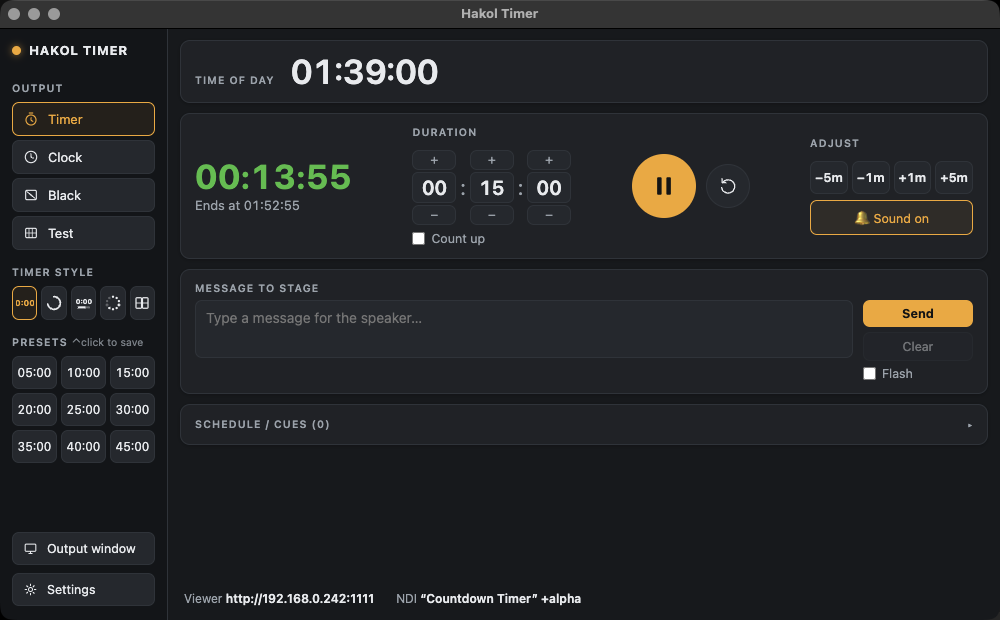
Load the agenda, then just press GO
Build the day as a list of cues — each with a title, a duration and a start time — or import it from a plain text file, so a thirty-session programme is ready in seconds. During the event you step through with next, previous or GO, which loads the next session and starts its countdown in one move. Sessions that have played grey out or leave the list, as you prefer.
Speakers always know where they stand
- A large countdown on the stage screen or a dedicated confidence monitor.
- Green, orange and red colour zones, then overtime in red.
- Short messages to the speaker — "5 minutes", "wrap up", "take questions" — shown over the timer.
- The session end time, so moderators can plan the handover.
Every room, every screen
Moderators, stage managers and the green room can follow the same timer on a phone or tablet: open the LAN web viewer address in any browser on the venue network. The streaming or IMAG team takes the timer as an NDI source, with an alpha channel if they want to key it over the programme.
Fits the production you already have
Hakol Timer ships a ready-made Bitfocus Companion module for Stream Deck control and listens for OSC, so it works alongside QLab, vMix and the rest of the control desk. Add your client's logo to the display for a branded look.
Frequently asked
How do I keep a conference on schedule?
Load the agenda into Hakol Timer as cues, then use GO to start each session. Every speaker sees their remaining time with colour warnings, and the operator can send "wrap up" messages to the stage.
Can I import the conference agenda?
Yes. The run of show can be imported from a plain text file or JSON, each item with a title and a duration.
Can moderators see the timer on their phones?
Yes. Any phone, tablet or laptop on the same network can open the timer in a browser, with nothing to install.
Is it free for corporate events?
Yes. Hakol Timer is free for everyone, including commercial events.
Try it on your next show
Hakol Timer is free for Mac and Windows. Create an account and download it in under a minute.
Made by Hakol Sound for the live-production community · Terms · Privacy · Accessibility